
Turn Your SaaS Features Into Workflow Actions
Let users automate the tasks they already perform in your product. Create actions for updating records, sending messages, assigning work, and more, then make them available inside your embedded workflow builder.
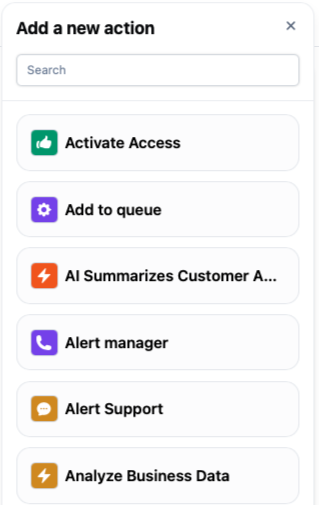
Give Users Control Over What Happens Next
Your product provides the capabilities. Your users decide how to put them together.
Actions turn individual operations into reusable workflow steps. Configure what each action does, then let users combine them into processes that fit how their business works.
Make Your Product’s Operations Available as Actions
Connect actions to your API so users can automate work inside your SaaS. Define the request behind each operation and give it a name users recognize.
- Create a task or customer record
- Update an invoice status
- Assign an account owner
- Retrieve information for a later step
You can configure API actions yourself or generate them from your OpenAPI specification.
Let Users Configure Each Step
An action can serve different purposes depending on its settings. Define the form fields users complete when they add it to a workflow.
For an “Update Invoice” action, that might mean choosing the new status. For “Send Message,” it could mean entering the message and selecting a destination.
- Add fields for the settings users can change
- Offer dropdowns with predefined choices
- Mark essential inputs as required
- Give each action a clear name and description
Carry Data From One Action to the Next
Connect steps through the information they produce. A workflow can retrieve a customer record, use its details to create a task, and include the new task’s reference in a notification.
- Use data supplied when the workflow starts
- Insert account and user information
- Pass API response values into later steps
- Combine fixed settings with dynamic placeholders
Add Custom Logic Where You Need It
Some operations need more than a straightforward API request. Use a Custom Code action to process workflow data with JavaScript or TypeScript and return results for subsequent steps.
- Calculate totals or derived values
- Reformat data before sending it elsewhere
- Process lists and structured responses
- Make requests to external services
Control When Work Continues
Actions can also manage the timing of a process. Add a delay, wait until a particular time, or pause for human input or a system event.
- Wait before sending a follow-up
- Hold a step until business hours
- Pause while an approval is pending
- Continue after the required event arrives
Organize the Actions Users Can Access
Keep the action catalog relevant to your product and its users. Group related actions into categories and assign access through user groups.
- Organize actions by business function
- Add names, descriptions, and icons
- Limit selected actions to specific groups
- Share common actions across groups
Create automations that match your product.
From CRMs to marketplaces to internal tools, Embed Workflow adapts to your frontend and disappears into your brand. The editor fits your UI, your logic, and your users’ expectations.

SaaS Platforms
Let your users create their own automations, including sending reminders, assigning tasks, updating records, and notifying teammates automatically.

eCommerce Order Handling
Let vendors create their own automations, including order alerts, shipping updates, low-stock warnings, and customer messages automatically.

Enterprise Dashboards
Provide per-client branding and logic so each customer can have their own visual identity, rules, and automation behavior within the same shared platform.

Internal Tools
Add embedded automation to your internal systems so teams can define structured rules that trigger follow-up actions, notifications, and task creation directly inside the tools they already use.

CRM Follow-ups
Add built-in automation to your CRM so teams can define structured follow-up rules based on lead status, deal stage, inactivity, or time delays.
How It Works
Set up our white-label workflow software in only a few minutes.
1. Seamless integration
It runs in your UI, under your brand, on your site. Users stay inside your app instead of jumping to external tools.


2. Embed our app with one line of code
Add our workflow builder to your application with a single line of code.
3. Set the available options
Define the actions and triggers your users can access in their workflow automations.


4. Let your users automate!
Your users can create workflows directly in your application by connecting pre-configured actions.
5. Monitor performance
Track workflow executions, performance metrics, and error logs across all users.

FAQs
What is a workflow action?
An action is a step that performs an operation within a workflow. It might call an API, process data, update a record, or pause execution before the next step.
Who creates the actions available in our SaaS?
Your team configures the actions your product offers. Users then select and configure those actions in the embedded builder to create their own workflows.
Can actions call our existing API?
Yes. API actions can call your endpoints using configured request parameters, headers, and authentication. Response data can then be made available to subsequent steps.
Do users need to write code to configure actions?
No. You can provide actions with forms that collect the settings users need to supply. Your team defines the underlying request or code, while users configure the fields you expose.
Can an action use information from earlier steps?
Yes. Actions can use values returned by earlier actions, along with execution data and account or user variables. Placeholders insert those values into the current step’s configuration.
Can we include our own business logic?
Yes. Custom Code actions support JavaScript and TypeScript for calculations, transformations, API calls, and other logic. They can read available workflow data and return output for later actions.
Can different users have access to different actions?
Yes. Assign actions to specific user groups to control their availability. Common actions can be shared across groups, while specialized actions remain available only to the relevant users.